Web & Design / Case Study 01

Vanguard Steel
Vancouver

From traditional product catalogs to a connected digital resource.

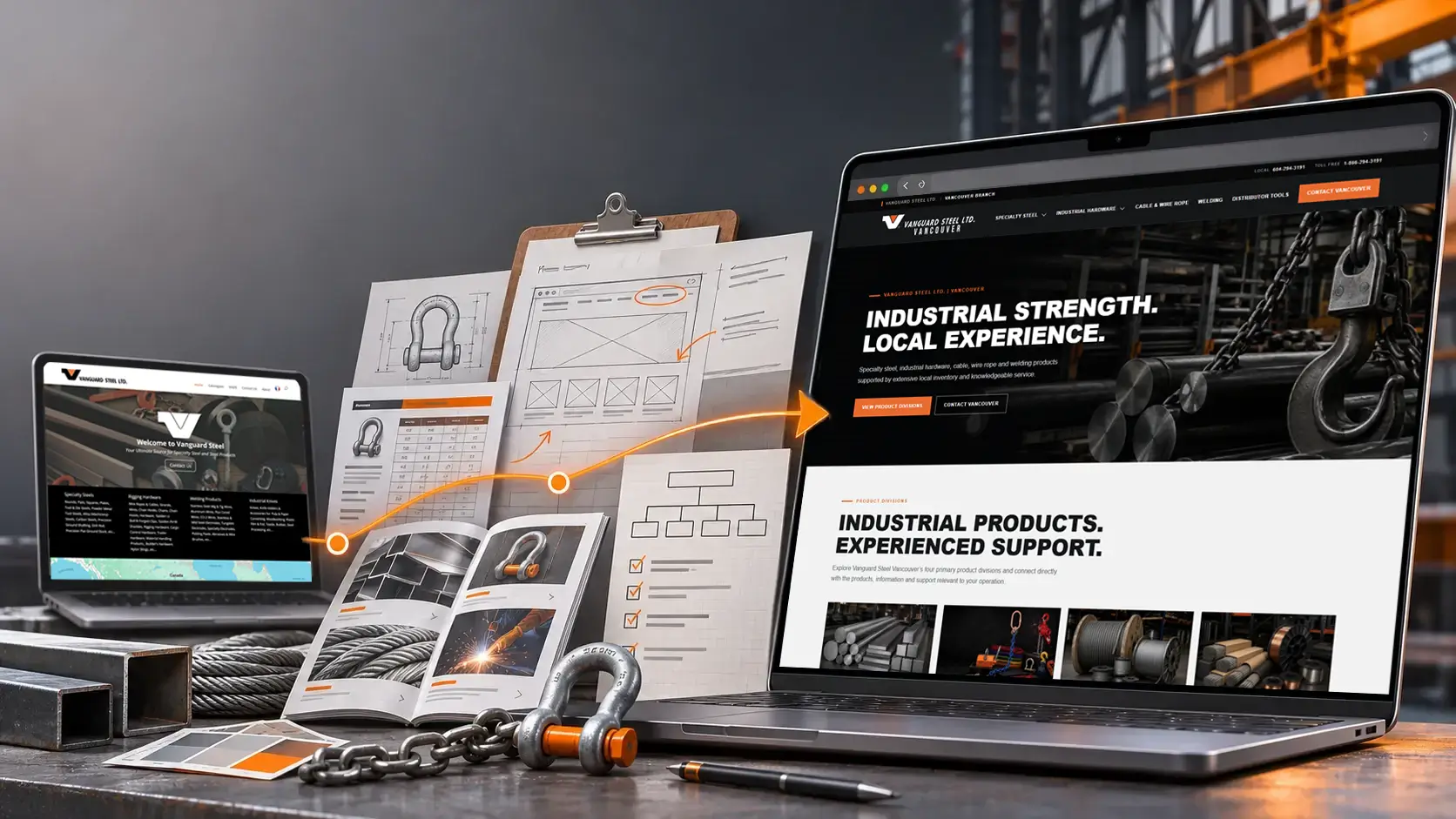
Vanguard Steel website transformation featuring the original corporate homepage, website planning and redesigned Vancouver website.

Original corporate website • Planning and development • Vancouver digital experience

Website strategy, visual design and technical product tools brought together to make complex industrial information easier to find, understand and use.

Specialty Steel
Industrial Hardware
Cable & Wire Rope
Welding
01 / Understanding the Business

One Company.
Different Customer Needs.

Vanguard Steel Vancouver serves several distinct industrial markets. A machine shop sourcing precision steel approaches a purchase differently from a distributor identifying lifting hardware for a customer. Understanding those differences was essential to building a website that works for the people using it.

DIVISION 01

Specialty Steel

Machine Shops / Manufacturers / End Users

Steel customers often arrive with a specific material requirement. They know the grade, dimensions or condition they need and want to establish availability, cutting options and technical specifications.

What the customer needs

Material grades, sizes, conditions, technical information, mill certification, cutting capabilities and availability.

The Website Approach

Organize steel by material family and application, provide useful shop calculators and make it easier to move from a material requirement to an informed inquiry.
DIVISION 02

Industrial Hardware

Distributors / Storefronts / End Users

Industrial hardware requires a different approach. The website must support both customers who already know what they need and those who need help understanding the products.

The Distributor

Needs to identify products, locate part numbers, check specifications and respond to customer requests quickly.

The End User

Needs clear product information, working load limits, application guidance, inspection information and access to technical resources.

The Website Approach

Combine visual catalog navigation, searchable product information, technical education and developing interactive selection tools to support both customer journeys.

Supporting Product Divisions
03

Cable & Wire Rope

Help customers navigate wire rope constructions, cable types, fittings and technical information with clearer product categories and supporting educational content.

04

Welding

Organize welding consumables by process, product family and common terminology, making classifications and product information easier to locate.

The Design Challenge

The goal was not to force every customer down the same path. It was to create one connected website with a consistent visual identity, while giving each customer a clearer route to the information they actually need.

02 / From Structure to Experience

From Browsing Catalogues
to Finding Products.

The original corporate website organized products into broad catalogue collections. For Vancouver, the opportunity was to build on that foundation by making individual product families easier to discover, search and explore. The goal wasn't to eliminate traditional catalogues. It was to make them part of a more connected digital experience.

Before / Corporate Website

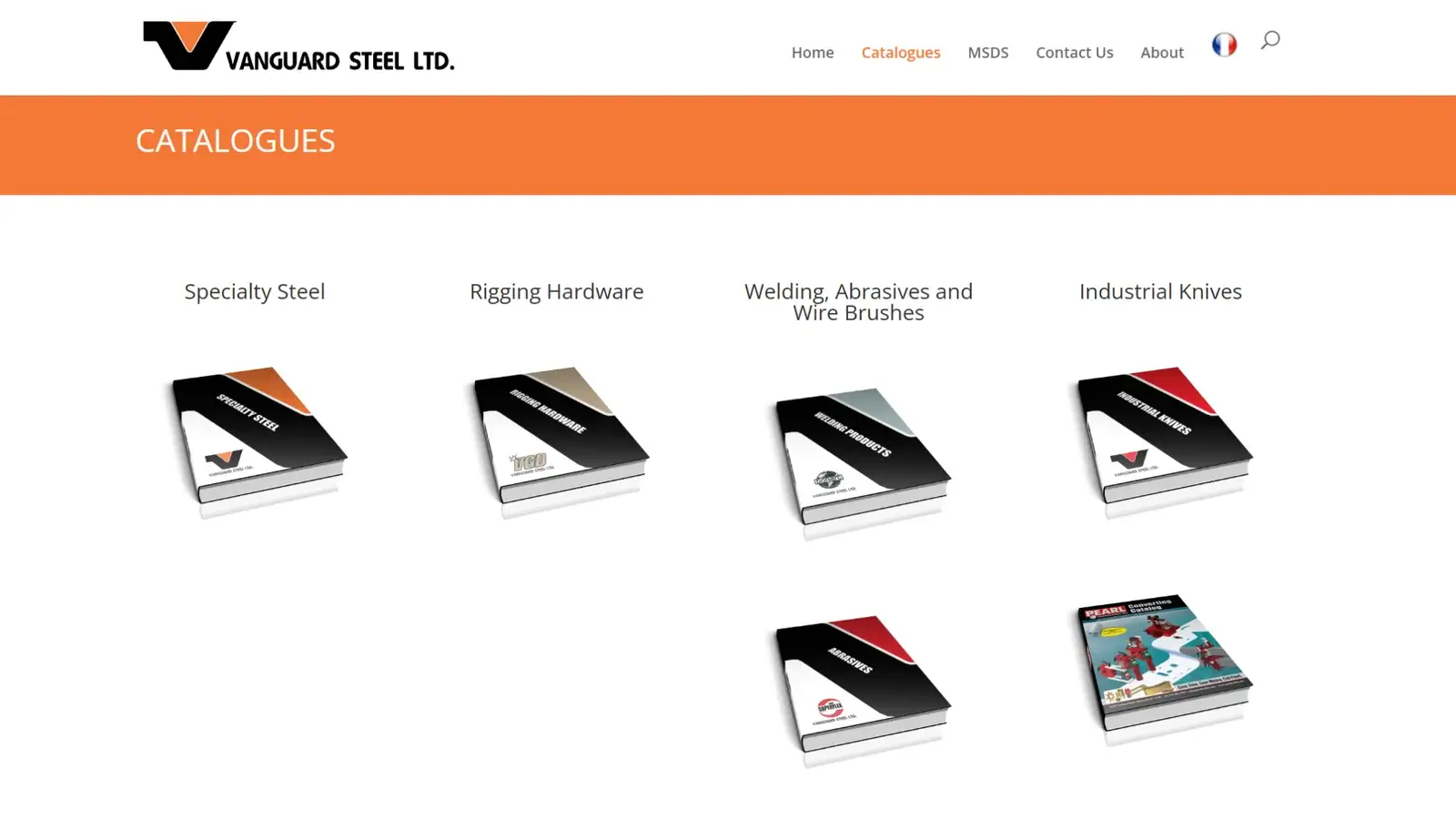
The Traditional Catalogue

Original Vanguard Steel corporate website showing traditional product catalogue divisions with PDF catalogue covers.

The corporate website presented its product offerings through several principal catalogue divisions. Customers could choose a catalogue, open the document and navigate through the pages to locate the products and specifications they needed.

Broad divisions. Traditional PDF navigation.
After / Vancouver Website

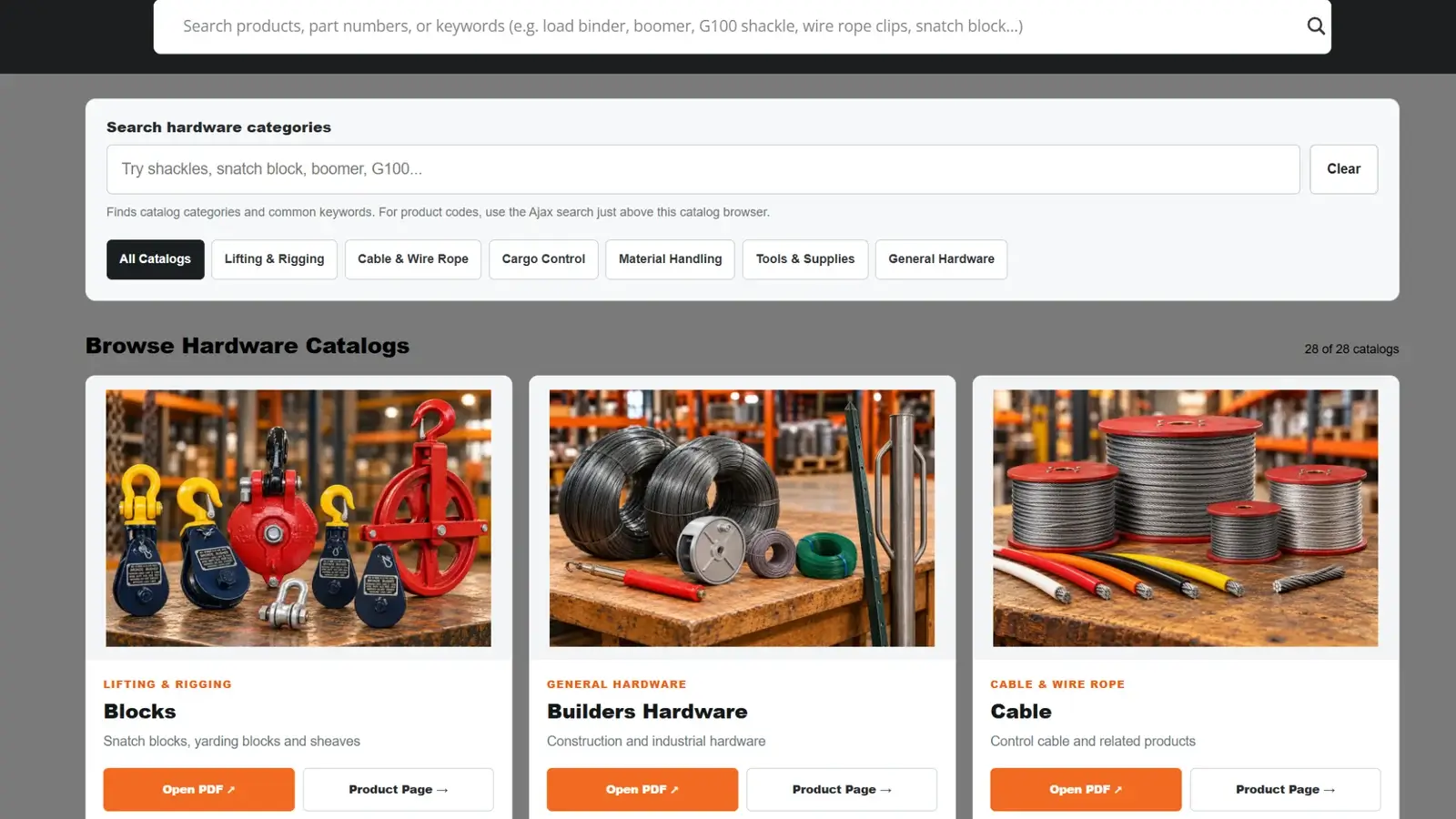
A Connected Product Experience

Redesigned Vanguard Steel Vancouver hardware catalogue featuring product search, category filters and visual product cards.

The Vancouver hardware experience introduces visual product categories, search functions and direct access to individual product pages. Customers can explore products by category, search for familiar names or part numbers and still access the original technical catalogues.

Visual categories. Product search. Technical information.
The Design Response

Three Ways to Find What You Need.

01 / EXPLORE

Browse by Product Category

Recognizable product imagery and category filters help customers explore industrial hardware without having to begin with a product code.

02 / SEARCH

Find Products Directly

Category keyword searches and a separate product search provide different ways to locate information, including product names and part numbers.

03 / CONNECT

Go Beyond the Catalogue

Product pages, PDF catalogues and technical resources work together, giving customers a clearer path from browsing to detailed information.

03 / Interactive Product Guidance

Beyond the Catalogue.
Into Product Guidance.

Finding a product is only part of the customer experience. For technical products, the next challenge is understanding which options meet the customer's requirements. Interactive tools can turn product data into a more useful starting point.

Featured Digital Tool

VGD Golden Pin®
Shackle Selector

Shackles are available in different styles, sizes and working load limits. Understanding the differences is important, particularly when customers are identifying products for lifting and rigging applications.

The Golden Pin Shackle Selector was developed to connect a chosen shackle style and required straight, in-line load with the corresponding Vanguard product information.

For Distributors

A practical way to identify VGD product codes, published working load limits and product series.

For End Users

Clearer explanations of shackle styles, technical information and relevant product considerations.

Try the Live Shackle Selector
How the Live Selector Works
01

Choose the Shackle Style

Start with the connection type required for the application.

Anchor / 2902 Safety Anchor / 2914 Chain / 3912
02

Enter the Required Load

Enter the required straight, in-line load and select the corresponding unit of measure.

03

View the Recommended Product

The live selector identifies the smallest listed shackle in that style with a published working load limit meeting the entered load.

Product Series VGD Product Code Working Load Limit Recommended Shackle

Workflow illustration only. The actual selector operates on Vanguard Steel Vancouver's website. Its recommendations apply to straight, in-line loading only. Application and connection suitability must still be verified.

The Design Response

Making Technical Information Useful.

01 / UNDERSTAND

Explain the Differences

Clear product descriptions help visitors understand the distinctions between anchor, safety anchor and chain shackles.

02 / IDENTIFY

Connect Loads to Products

Published working load information is linked to specific product series and VGD codes, providing a clearer starting point for product identification.

03 / EDUCATE

Support Informed Decisions

The surrounding product page connects the selector with inspection guidance, technical references and additional shackle information.

The purpose was not to replace technical judgement. It was to make product information more accessible and provide a practical connection between customer requirements and the VGD product range.

04 / Distributor Tools

Built for the Counter.
Designed to Grow.

Distributors often begin with a customer request, not a product code. The challenge is translating that request into identifiable products, relevant specifications and the information needed to continue the sales process. The VGD Distributor Tools project brings that workflow into a more connected digital experience.

The Business Challenge

From Customer Request
to Product Information.

A distributor may receive a request for a shackle, lifting sling or other industrial hardware item without being given an exact Vanguard product number.

Traditionally, identifying that product can mean moving between catalogues, product charts, descriptions and technical references before reaching the right answer.

The distributor tool is designed to bring those steps closer together, allowing the salesperson to begin with the customer's request and work toward the relevant product family and details.

Start with what the customer needs, not necessarily the product code.
The Distributor Workflow
01 / REQUEST

Customer Requirements

Begin with the product description, application or basic requirements provided by the customer.

02 / FIND

Search or Browse

Search by product name or browse visually by product family to find the most relevant starting point.

03 / IDENTIFY

Product Family and Details

Move into the appropriate category and use the available product information or guided selection workflow.

04 / CONTINUE

Sales Information

Use the resulting product information to continue the conversation and support the next sales step.

This is a workflow illustration. Different product families can be expanded within the same interface as the platform develops.

One Starting Point. Multiple Product Families.

Visual Navigation for the Product Range.

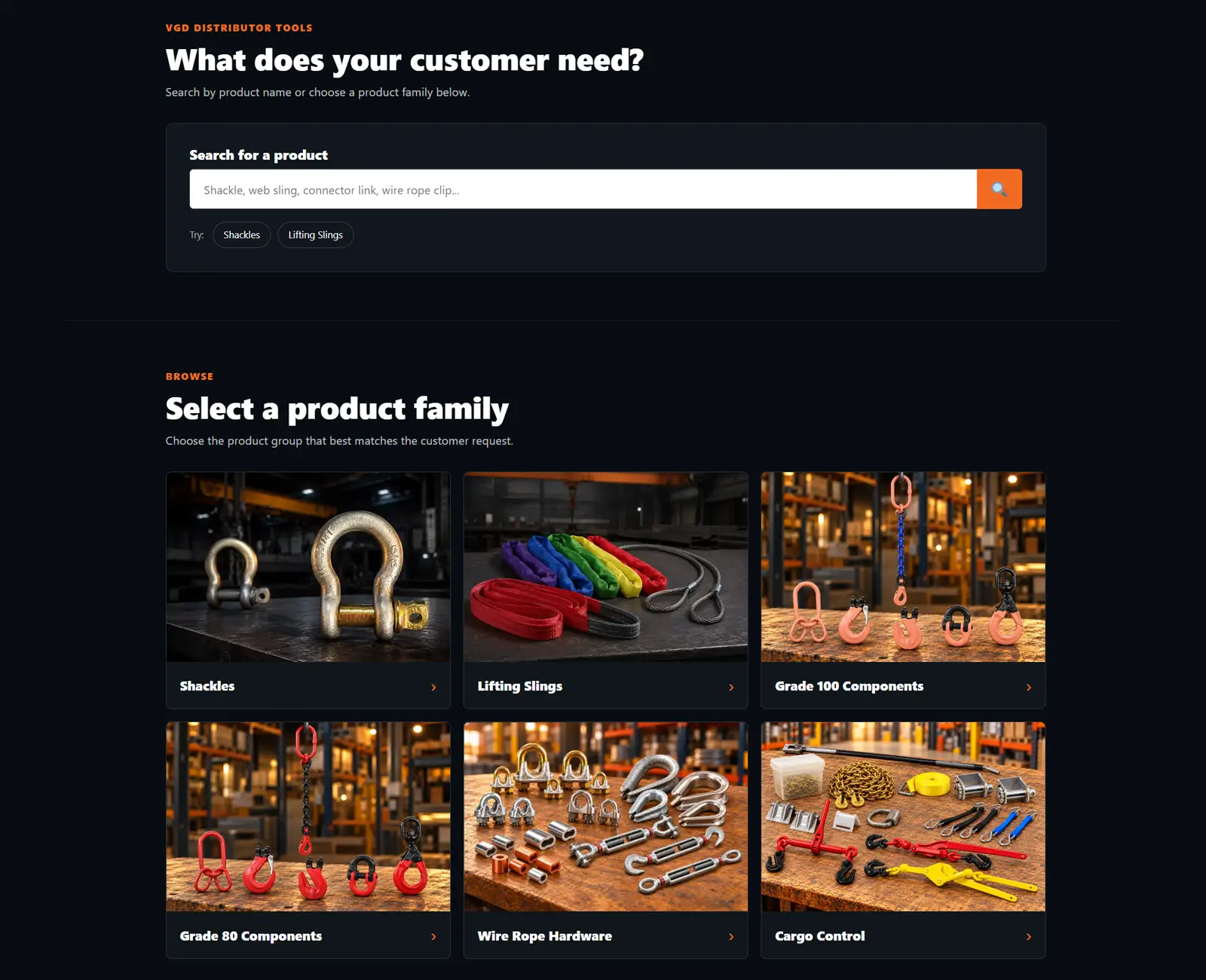
Customers can search for a product directly or browse the product family that best matches the request. This gives distributors a more practical way to move from a general inquiry toward the right category and supporting product information.

VGD Distributor Tools interface showing a product search bar and visual product-family categories including shackles, lifting slings, Grade 100 components, Grade 80 components, wire rope hardware and cargo control.
The interface combines direct search with visual product-family navigation, helping distributors choose a starting point based on the customer's request.
An Evolving Platform

The distributor tools are structured so product families can be expanded within a consistent experience. That makes it possible to add more product-specific workflows while keeping the interface familiar and easy to navigate.

The Design Response

Designed Around the Sales Process.

Familiar Navigation

A consistent interface helps distributors understand where to begin, whether they search by name or browse by product family.

Practical Product Identification

Product families, supporting details and guided workflows work together to move from inquiry toward usable product information.

Room for Expansion

The structure is designed to grow, allowing additional product families and more specialized tools to be added over time.

05 / Visual Identity & Technical Communication

One Visual Language.
Across Every Touchpoint.

A website is only one part of how a business presents itself. Product imagery, catalogue graphics, technical charts and digital tools all need to feel connected. The objective was to create a consistent visual experience without sacrificing the technical information customers rely on.

VGD / Visual Communication

Industrial Products.
Clear Communication.

Bold typography, strong contrast, practical imagery and orange accents create a consistent visual language throughout the Vancouver website.

The Design System

Consistency Across the Website.

A defined colour palette, clear heading hierarchy and consistent spacing help connect the different product divisions, technical resources and customer tools.

The same design principles extend into product presentations and supporting graphic material.

#F47728
#141A1F
#FFFFFF
#647078

The objective was to create more than a consistent website. It was to build a recognizable presentation across product information, catalogues, technical material and digital tools.

06 / The Finished Experience

A Website Built Around
How People Work.

Four distinct product divisions, different customer requirements and a broad range of industrial products. The Vancouver website brings them together through clearer navigation, consistent visual design, technical product information and interactive tools that support how customers actually work.

The Connected Result

More Than a Website Redesign.

Each part of the project serves a different purpose. Together, they create a more connected digital resource for Vanguard Steel Vancouver and the customers who rely on its products.

01 / BUSINESS

Built Around Customer Needs

Different pathways reflect the requirements of machine shops, distributors and end users.

02 / NAVIGATION

Easier Product Discovery

Visual categories, search and connected catalogues provide more ways to find information.

03 / TOOLS

Practical Product Guidance

Interactive resources connect customer requirements with relevant product information.

04 / DESIGN

A Consistent Visual Identity

Colour, typography, imagery and layout create continuity across the different product divisions.

The Perspective Behind the Project

Industrial Experience
Meets Digital Design.

My approach to this project comes from years of working directly with industrial customers, machine shops and distributors. Understanding how people search for products, ask technical questions and make purchasing decisions influenced the way the website was developed.

Combining that experience with website design, photography, graphic communication and interactive tools allowed me to approach the project from both a business and creative perspective.

The result is a website designed not simply to display products, but to become a useful resource for the people working with them.

Explore the Live Project

Vanguard Steel Vancouver

Explore the live website, its product divisions, visual catalogues, technical resources and interactive tools. See how the different parts of the project work together.

An ongoing project. The Vancouver website continues to evolve as new product information, technical resources and digital tools are developed.